 4b19a459b7
* Add input manager * WIP lifetime hell * Hell yeah, dark lifetime magic * Replace events with actions in tools * Fix borrow in GlobalEventHandler * Fix typo in response-handler * Distribute dispatch structure * Add translation from events to actions * Port default key actions to input_mapper * Split actions macro * Add handling for Ambiguous Mouse events * Fix warnings and clippy lints * Add actions macro * WIP rework * Add AsMessage macro * Add implementation for derived enums * Add macro implementation for top level message * Add #[child] attribute to indicate derivation * Replace some mentions of Actions and Responses with Message * It compiles !!! * Add functionality to some message handlers * Add document rendering * ICE * Rework the previous code while keeping basic functionality * Reduce parent-top-level macro args to only two * Add workaround for ICE * Fix cyclic reference in document.rs * Make derive_transitive_child a bit more powerful This addresses the todo that was left, enabling arbitrary expressions to be passed as the last parameter of a #[parent] attribute * Adapt frontend message format * Make responses use VecDeque Our responses are a queue so we should use a queue type for them * Move traits to sensible location * Are we rectangle yet? * Simplify, improve & document `derive_discriminant` * Change `child` to `sub_discriminant` This only applies to `ToDiscriminant`. Code using `#[impl_message]` continues to work. * Add docs for `derive_transitive_child` * Finish docs and improve macros The improvements are that impl_message now uses trait resolution to obtain the parent's discriminant and that derive_as_message now allows for non-unit variants (which we don't use but it's nice to have, just in case) * Remove logging call * Move files around and cleanup structure * Fix proc macro doc tests * Improve actions_fn!() macro * Add ellipse tool * Pass populated actions list to the input mapper * Add KeyState bitvector * Merge mouse buttons into "keyboard" * Add macro for initialization of key mapper table * Add syntactic sugar for the macro * Implement mapping function * Translate the remaining tools * Fix shape tool * Add keybindings for line and pen tool * Fix modifiers * Cleanup * Add doc comments for the actions macro * Fix formatting * Rename MouseMove to PointerMove * Add keybinds for tools * Apply review suggestions * Rename KeyMappings -> KeyMappingEntries * Apply review changes Co-authored-by: T0mstone <realt0mstone@gmail.com> Co-authored-by: Paul Kupper <kupper.pa@gmail.com> |
||
|---|---|---|
| .deployment | ||
| .github/workflows | ||
| .vscode | ||
| client | ||
| core | ||
| docs | ||
| .editorconfig | ||
| .gitattributes | ||
| .gitignore | ||
| Cargo.lock | ||
| Cargo.toml | ||
| graphite_logo.png | ||
| graphite_splash.png | ||
| LICENSE.txt | ||
| package.json | ||
| README.md | ||
| rustfmt.toml | ||
| vetur.config.js | ||


Powerful 2D vector and raster editing, made procedural and nondestructive.
Graphite is an in-development desktop graphics editor that strives to be the most powerful, intuitive, and versatile tool for fully-nondestructive vector and raster editing. It is early in development but the UI and UX design is relatively complete and highly promising. The first release, Graphite 0.1, will focus on SVG editing. Then 0.2 will make that nondestructive with a node graph. Later revisions will provide full resolution-agnostic raster editing capabilities.
We need Rust and web developers! Feel free to peruse the documentation and hop onto Discord to ask where to start:
Discord
If the Graphite project strikes your fancy, join our Discord community to chat with its developers and contributors. You're invited to stop by just to lurk, ask questions, offer suggestions, or get involved in the project. We are seeking collaborators to help design and develop the software and this is where we communicate. Paste https://di-sco-rd.gg/uM-jBz-5N68W into your browser and delete the dashes. (Please don't share the link on any website without the dashes.)
Design mockup
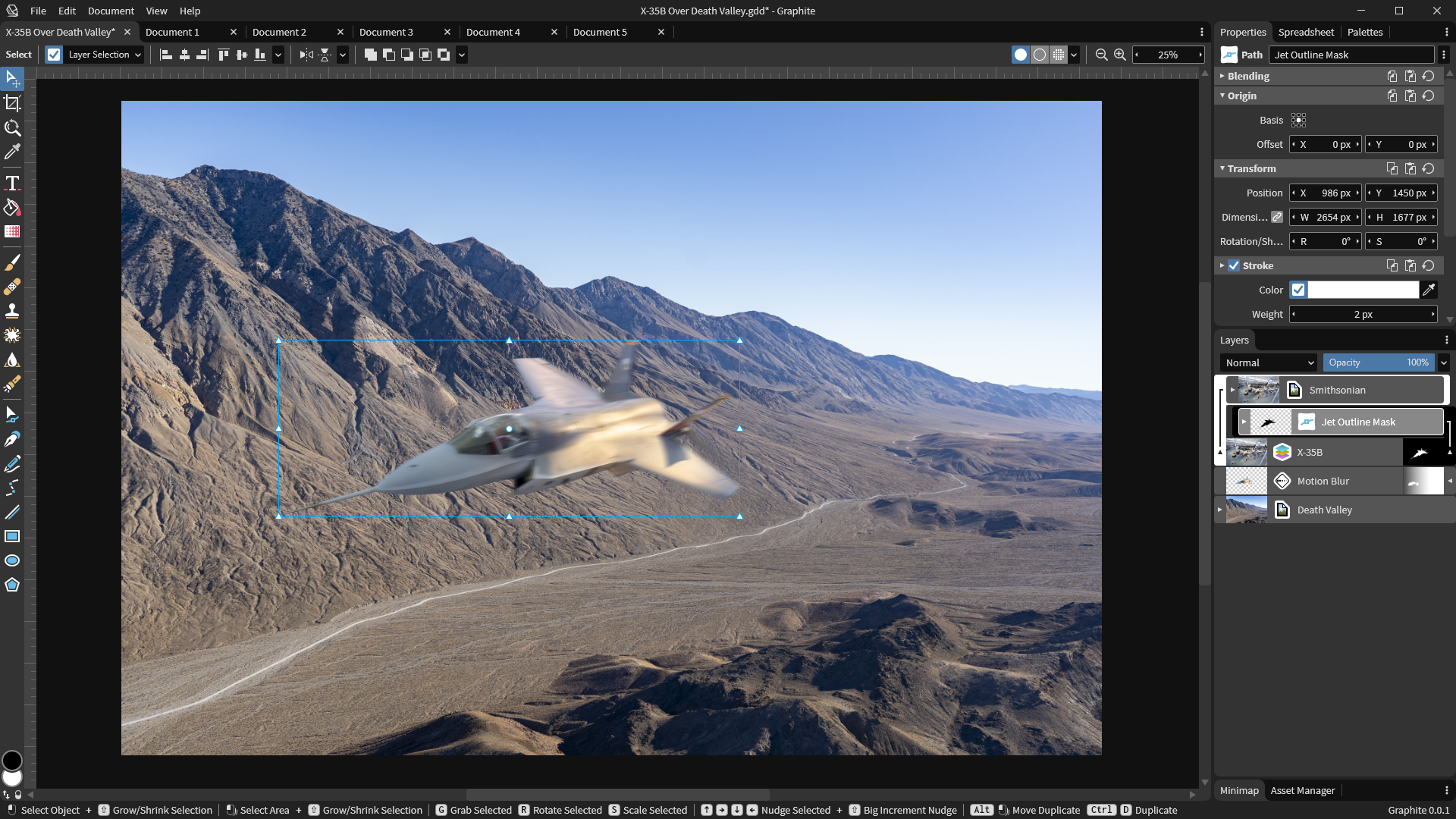
This is a work-in-progress mockup of the Document, Properties, and Layer Tree panels. The mockup is a nonfunctional pixel-perfect prototype, not code. It is presently being replicated by a functional web UI.
Vision
Watch the Announcement Talk at the Rust Gamedev Meetup (20 minutes)
Graphite is an open source, cross-platform digital content creation desktop and web application for 2D graphics editing, photo processing, vector art, digital painting, illustration, data visualization, and compositing. Inspired by the open source success story of Blender in the 3D domain, it aims to bring 2D content creation to new heights with efficient workflows influenced by Photoshop and Illustrator and backed by a powerful node-based, nondestructive approach proven by Houdini and Substance.
The user experience of Graphite is of central importance, offering a meticulously-designed UI catering towards an intuitive and efficient artistic process. Users may draw and edit in the traditional interactive (WYSIWYG) viewport with the Layer Tree panel or jump in or out of the node graph at any time to tweak previous work and construct powerful procedural image generators that seamlessly sync with the interactive viewport. A core principle of the application is its 100% nondestructive workflow that is resolution-agnostic, meaning that raster-style image editing can be infinitely zoomed and scaled to arbitrary resolutions at a later time because editing is done by recording brush strokes, vector shapes, and other manipulations parametrically.
One might use the painting tools on a small laptop display, zoom into specific areas to add detail to finish the artwork, then perhaps try changing the simulated brush style from a blunt pencil to a soft acrylic paintbrush after-the-fact, and finally export the complete drawing at ultra high resolution for printing on a large poster.
On the surface, Graphite is an artistic medium for drawing anything imaginable— under the hood, the node graph in Graphite powers procedural graphics and parametric rendering to produce unique artwork and automated data-driven visualizations. Graphite brings together artistic workflows and empowers your creativity in a free, open source package that feels familiar but lets you delve further.
Roadmap
We have recently scrapped the custom GUI library effort from 2020 and will use the web through HTML/CSS/Vue.js to quickly build a temporary user interface for the minimum viable product (MVP). While the UI remains web-based, Graphite will only compile to the web and Rust code will be run through WebAssembly (WASM) in the browser. The web UI will be replaced by a native interface when Rust GUI frameworks mature.
We are also focusing initial feature development on a destructive SVG vector editor for the 0.1 release. This will have all the basic vector editing features to read and write SVG files and edit with an improved user experience compared to Inkscape and Illustrator. Following this MVP release, these destructive features will be slotted into a fleshed-out node graph system to offer innovative nondestructive vector editing capabilities in a 0.2 release.
Immediate tasks in progress
- Write and publish formal product design documents based on scattered design notes
- Finish building all the Vue components for the main Graphite user interface
- Build the core editor state system in Rust that powers the Graphite frontend
- Launch a website at www.graphite.design with a home page, blog, manual, and code documentation
Remaining tasks for the MVP (0.1 release)
- Editor Core Library
- WASM wrapper for Editor Core Library
- Panel system
- Drawing vector shapes on screen
- Properties panel and vector styling
- Layers/groups system
- Operator system
- Operators: boolean, align, apply shape
- Tool system
- Tools: Line, rectangle, ellipse, and shape
- Tools: Pen and path
- Tools: Select, crop, navigate, eyedropper
- SVG import and export
Technology stack
Rust is the language of choice for a number of compelling reasons. It is low-level and highly efficient which is important because the nondestructive, resolution-agnostic editing approach will already be challenging to render fast enough for real-time, interactive editing. Furthermore, Rust makes multithreading very easy to implement and its safety guarantees will eliminate the inclusion of many bugs and crashes in the software. It is also easy to compile Rust code natively to Windows, macOS, Linux, and web browsers via WebAssembly, with the possibility of deploying Graphite to mobile devices down the road as well.
Vue.js is the web frontend framework initally used for building Graphite's user interface. This means, for the moment, Graphite will only run in a browser using Rust code compiled to WebAssembly (via wasm-bindgen). This web-based GUI is intended to be rewritten in a native Rust GUI framework once that ecosystem matures or a developer can write a custom GUI framework suitable to the subset of features needed by Graphite's user interface. The project was initially trying to write a custom GUI framework throughout 2020, but this was halting progress on higher-priority features.
WebGPU (via the WGPU Rust library) will be used as the graphics API because it is modern, portable, and safe. It makes deployment on the web and native platforms easy while ensuring consistent cross-platform behavior. Shaders will be written in Rust GPU to keep the codebase in a consistent language. Graphite 0.1 and 0.2 will rely on the browser's built-in vector rendering capabilities for SVG editing before diving into building Graphite's complex render engine.
Running the code
The project is split between clients and core libraries (which use the clients). Currently the only important client is the web frontend (/client/web). There's also a CLI client (/client/cli) that may be useful for testing. The only core library so far is the Editor Core Library (/core/editor). The web client's Vue code lives in /client/web/src and a Rust wrapper for the Editor Core Library (which exposes functions to JavaScript through bindings generated by wasm-bindgen) lives in /client/web/wasm.
A good starting point for learning about the code structure and architecture is reading the documentation.
Web client
This is the primary means of running and developing the project. You may need to download and install a recent version of Rust and Node.js.
npm run serve
After editing some Rust and TypeScript code, you may need to manually restart the developments server because this is not properly watching all files right now. (Please submit a PR to help fix this!)
You can also use npm run lint as well as npm run build (the static files will end up in /client/web/dist).
CLI client
This may be useful for testing at some point.
cargo run
Editor core library
This will be run and tested mainly through the web frontend, which builds the Rust code into WebAssembly automatically. But if you need to build the code on its own:
cd core/editor
cargo build