Our own tutorial and the one by Steve Klabnik both require experience
with Git. Adding a link to "Jujutsu for everyone" will give newcomers
without that experience an appropriate starting point for learning
Jujutsu.
The pico text editor is effectively absent from the majority of Linux
distributions, having been replaced with nano by virtually all of them.
Some distros have symlinks for `pico` that point to `nano`, but not all
of them. Using nano as the fallback option has a much lower chance of
failure than pico.

Co-authored-by: Remo Senekowitsch <remo@buenzli.dev>
New users (especially ones unfamiliar with CLI programs) intuitively
expect `jj undo` to work the same way the "undo" functionality of
typical GUI applications do. That means, running `jj undo` multiple
times should restore progressively older states of the repository
one-by-one.

Related feature request "jj undo ergonomics":
https://github.com/jj-vcs/jj/issues/3700
This paves the way for the semantics of `jj undo` and `jj op revert` to
evolve independently. `jj op revert` is going to stay the low-level
command to apply the inverse of any operation. The new name is
consistent with `jj revert`, which applies the inverse of a commit.

`jj undo` on the other hand is planned to become a higher-level command,
which is more similar to, say, Ctrl+Z in typical GUI applications.
Running `jj undo` repeatedly will revert progressively older operations,
allowing the user to walk backwards in time. At the same time, `jj undo`
will lose the abilitly to revert arbitrary operations, to keep its
semantics simple and intuitive.

Related feature request "jj undo ergonomics":
https://github.com/jj-vcs/jj/issues/3700
The commit id prefix here should be `f7fb5943`, from the working copy's parent before
the squash (on line 351). Also see line 413 where the full commit id is shown in the
`Undid operation` message.
`jj amend` is discouraged and no longer a visible alias of `jj squash` since 6d78d92. This
is the only remaining occurrence of it in the docs. We should recommend using `jj
squash` directly instead.
It seems everyone agrees that `obslog` is not an intuitive name. There
was some discussion about alternatives in #3592 and on #4146. The
alternatives included `evolution`, `evolutionlog`, `evolog`,
`rewritelog`, `revlog`, and `changelog`. It seemed like
`evolution-log`/`evolog` was the most popular option. That also
matches the command's current help text ("Show how a change has
evolved over time").
I was thinking of updating the tutorial in #4168, but conversations like [this
one on
Discord](1269803837)
suggest that many people aren't reading it anyway.

So, this is an attempt to quickly patch up the most relevant things before the
upcoming release.
Summary: As discussed in Discord, on GitHub, and elsewhere, this change
deprecates the use of `jj checkout` and suggests users use `jj new` exclusively
instead. The verb `checkout` is a relic of a bygone era the — days of RCS
file locking, before 3-way merge — and is not a good, fitting name for the
functionality it provides.

To further drive the bit home, by default, `jj checkout` (and `jj co`) is now
hidden. This will hopefully stop new users from running into it.

Signed-off-by: Austin Seipp <aseipp@pobox.com>
Change-Id: I7a1adfc9168fce1f25cf5d4c4c313304769e41a1
This allows the tutorial to reference them and will make it
easier to have different instructions for different versions.

We can later restore some instructions to the README, but I
think this is important since the installation instructions
do change in important (even if slight) ways from time to
time.
The `--allow-large-revsets` flag we have on `jj rebase` and `jj new`
allows the user to do e.g. `jj rebase --allow-large-revsets -b
main.. -d main` to rebase all commits that are not in main onto
main. The reason we don't allow these revsets to resolve to multiple
commits by default is that we think users might specify multiple
commits by mistake. That's probably not much of a problem with `jj
rebase -b` (maybe we should always allow that to resolve to multiple
commits), but the user might want to know if `jj rebase -d @-`
resolves to multiple commits.

One problem with having a flag to allow multiple commits is that it
needs to be added to every command where we want to allow multiple
commits but default to one. Also, it should probably apply to each
revset argument those commands take. For example, even if the user
meant `-b main..` to resolve to multiple commits, they might not have
meant `-d main` to resolve to multiple commits (which it will in case
of a conflicted branch), so we might want separate
`--allow-large-revsets-in-destination` and
`--allow-large-revsets-in-source`, which gets quite cumbersome. It
seems better to have some syntax in the individual revsets for saying
that multiple commits are allowed.

One proposal I had was to use a `multiple()` revset function which
would have no effect in general but would be used as a marker if used
at the top level (e.g. `jj rebase -d 'multiple(@-)'`). After some
discussion on the PR adding that function (#1911), it seems that the
consensus is to instead use a prefix like `many:` or `all:`. That
avoids the problem with having a function that has no effect unless
it's used at the top level (`jj rebase -d 'multiple(x)|y'` would have
no effect).

Since we already have the `:` operator for DAG ranges, we need to
change it to make room for `many:`/`all:` syntax. This commit starts
that by allowing both `:` and `::`.

I have tried to update the documentation in this commit to either
mention both forms, or just the new and preferred `::` form. However,
it's useless to search for `:` in Rust code, so I'm sure I've missed
many instances. We'll have to address those as we notice them. I'll
let most tests use `:` until we deprecate it or delete it.
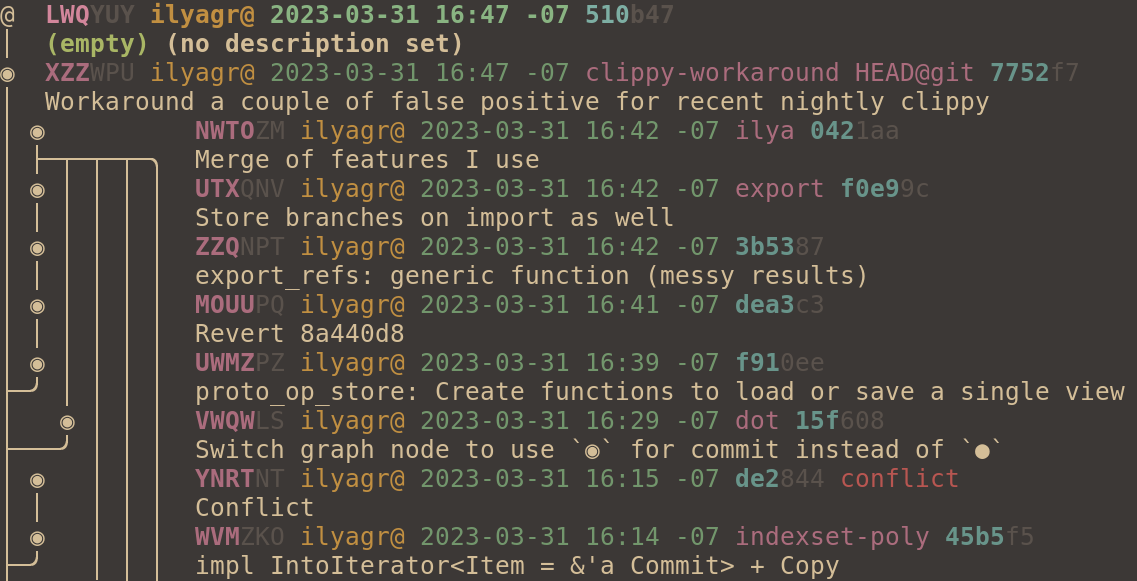
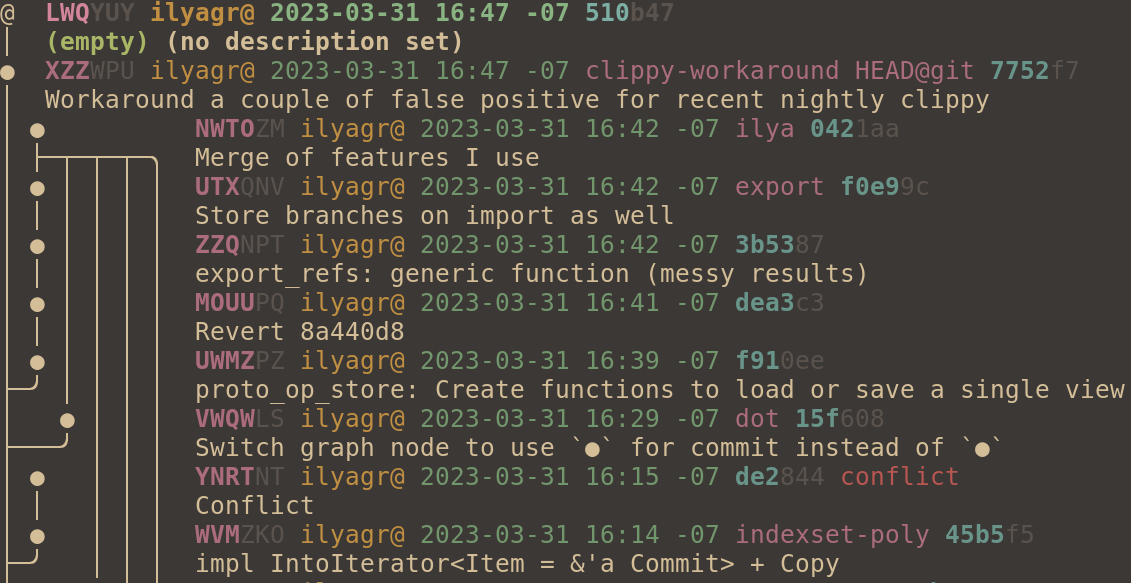
@joyously found `o` confusing because it's a valid change id prefix. I
don't have much preference, but `●` seems fine. The "ascii",
"ascii-large", and "legacy" graph styles still use "o".

I didn't change `@` since it seems useful to have that match the
symbol used on the CLI. I don't think we want to have users do
something like `jj co ◎-`.
We have made some changes to CLI output that had not made it into the
tutorial. It's time to update it, especially with the new change id
rendering. Since I'm updating it now, and since it's a bit of work to
do so, I decided to use GitHub's Hello-World repo instead of jj's own
repo as our example.
The heading says it's going to explain aliases, but it doesn't, and
now that we've documented aliases in config.md, we probably don't need
to mention it in the tutorial.